
كيف تحجز
How to book
خمس خطوات ودقيقتان. ولا حساب مطلوب — الحساب يُريحك لاحقاً ولا يمنعك اليوم.
Five steps and two minutes. No account required — an account helps you later, it does not stop you today.
قبل أن تبدأ
Before you start
- بلا حسابNo accountتحجز وتدفع كضيف. وإن أنشأت حساباً بالبريد نفسه لاحقاً، ظهرت حجوزاتك السابقة فيهYou can book and pay as a guest. If you register later with the same email, your past bookings appear in the account
- الفتراتSlotsمن 08:00 إلى 18:00، كل نصف ساعة08:00 to 18:00, every half hour
- السعرPriceللمركبة لا للشخص، وشامل ضريبة القيمة المضافة 5%Per vehicle, not per person, and inclusive of 5% VAT
- الدفعPaymentعلى صفحة ثواني الآمنة. بيانات بطاقتك لا تمرّ بنا ولا نحفظهاOn Thawani's secure page. Your card details never pass through us and we do not store them
خطوات الحجز
The booking steps
افتح صفحة بوجي سفاري واضغط «احجز الآن». تفتح لك هذه الخطوات، وواحدةٌ في كل مرّة.
Open the Buggy Safari page and press “Book now”. These steps open, one at a time.
ابدأ من صفحة التجربة
Start from the experience page
اختر «بوجي سفاري» من القائمة. تقرأ فيها المسار والخيارين والسعر، ثم تضغط «احجز الآن» — وهو زرٌّ يلازم أسفل الشاشة فلا تحتاج أن تصعد للبحث عنه.
Choose “Buggy Safari” from the menu. You read the trail, the two options and the price there, then press “Book now” — a button that stays at the bottom of the screen, so you never scroll up hunting for it.
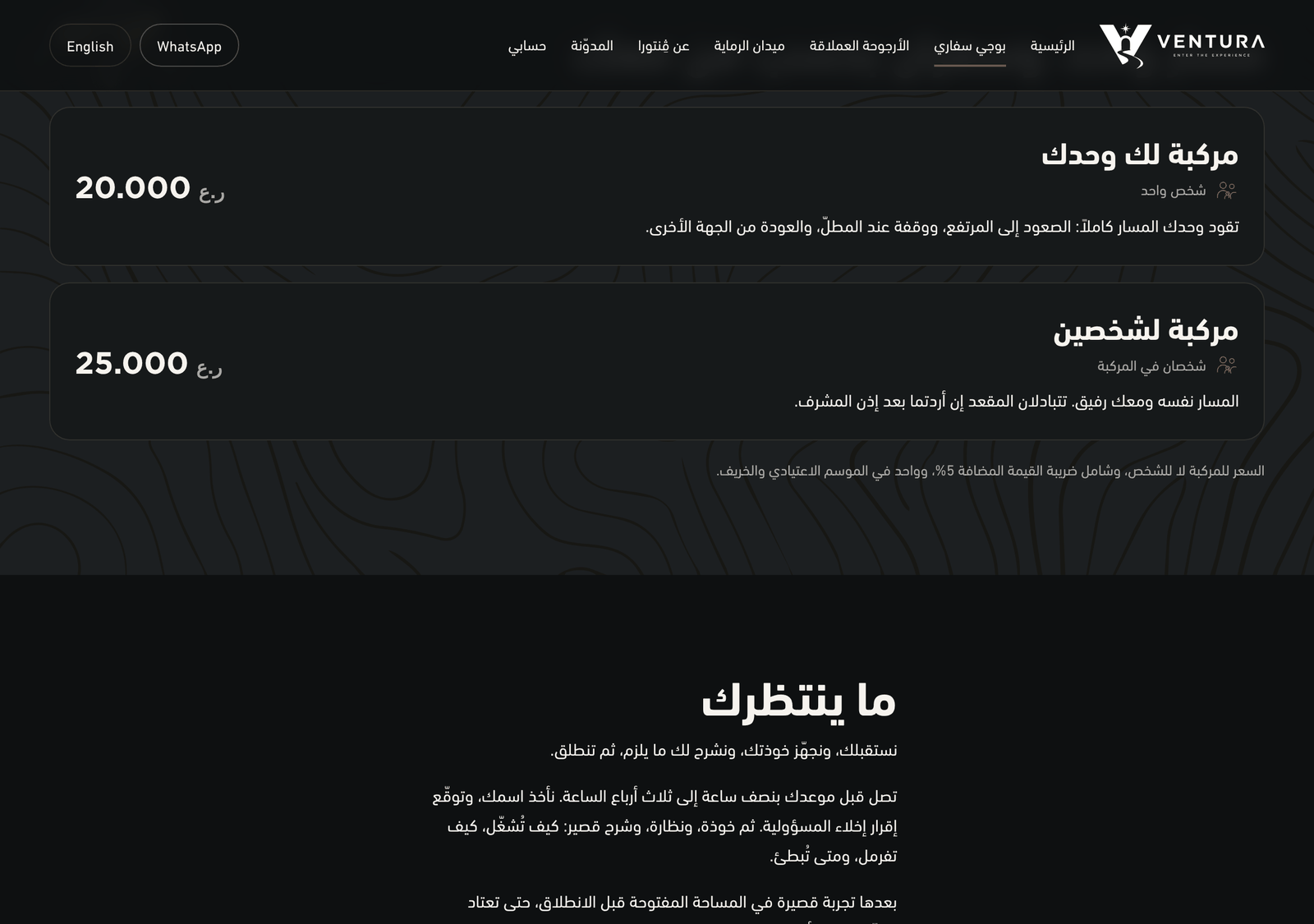
صفحة بوجي سفاري: الخياران وسعر كلٍّ منهماThe Buggy Safari page: the two options and each price اختر اليوم
Pick the day
اكتب التاريخ أو اختره من التقويم. ثم اضغط «التالي».
Type the date or pick it from the calendar, then press “Next”.
الشريط أعلى المعالج يبيّن أين أنت من الخمس، وتستطيع الرجوع في أي لحظة بلا فقدان ما أدخلته.The bar at the top of the wizard shows where you are among the five, and you can go back at any point without losing what you entered.
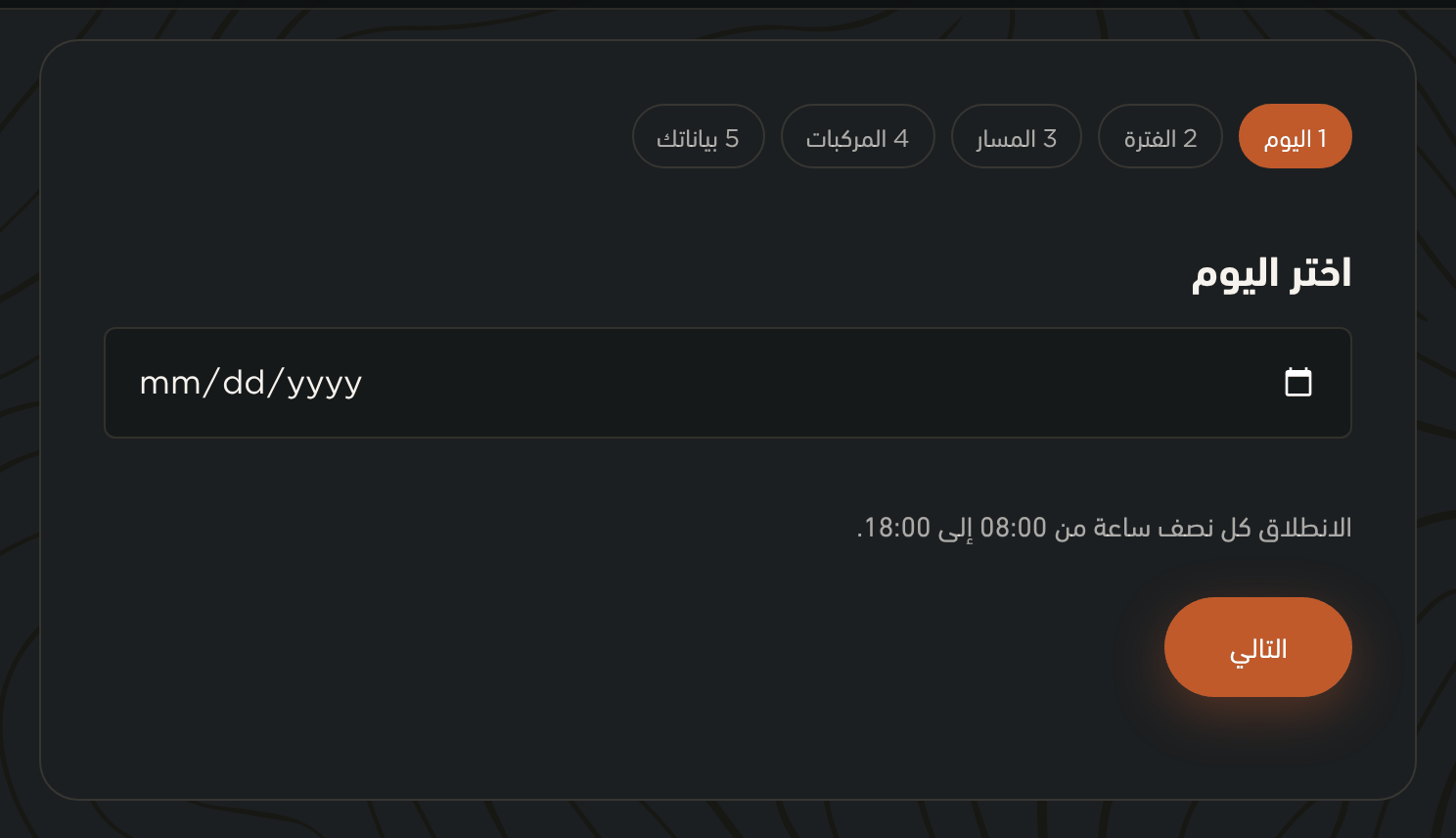
الخطوة الأولى في معالج الحجز: حقل التاريخThe first step of the booking wizard: the date field اختر الفترة
Pick the slot
تحت كل فترة عددُ ما بقي فيها. والفترة النافدة تُعرَض مكتوباً عليها «نفدت» ولا تُخفى — فتعرف أنّها كانت موجودة ولا تظنّ أنّنا لا نعمل في ذلك الوقت.
Under each slot is how many places remain. A full slot is shown marked “Sold out” rather than hidden — so you know it existed and do not assume we are closed then.
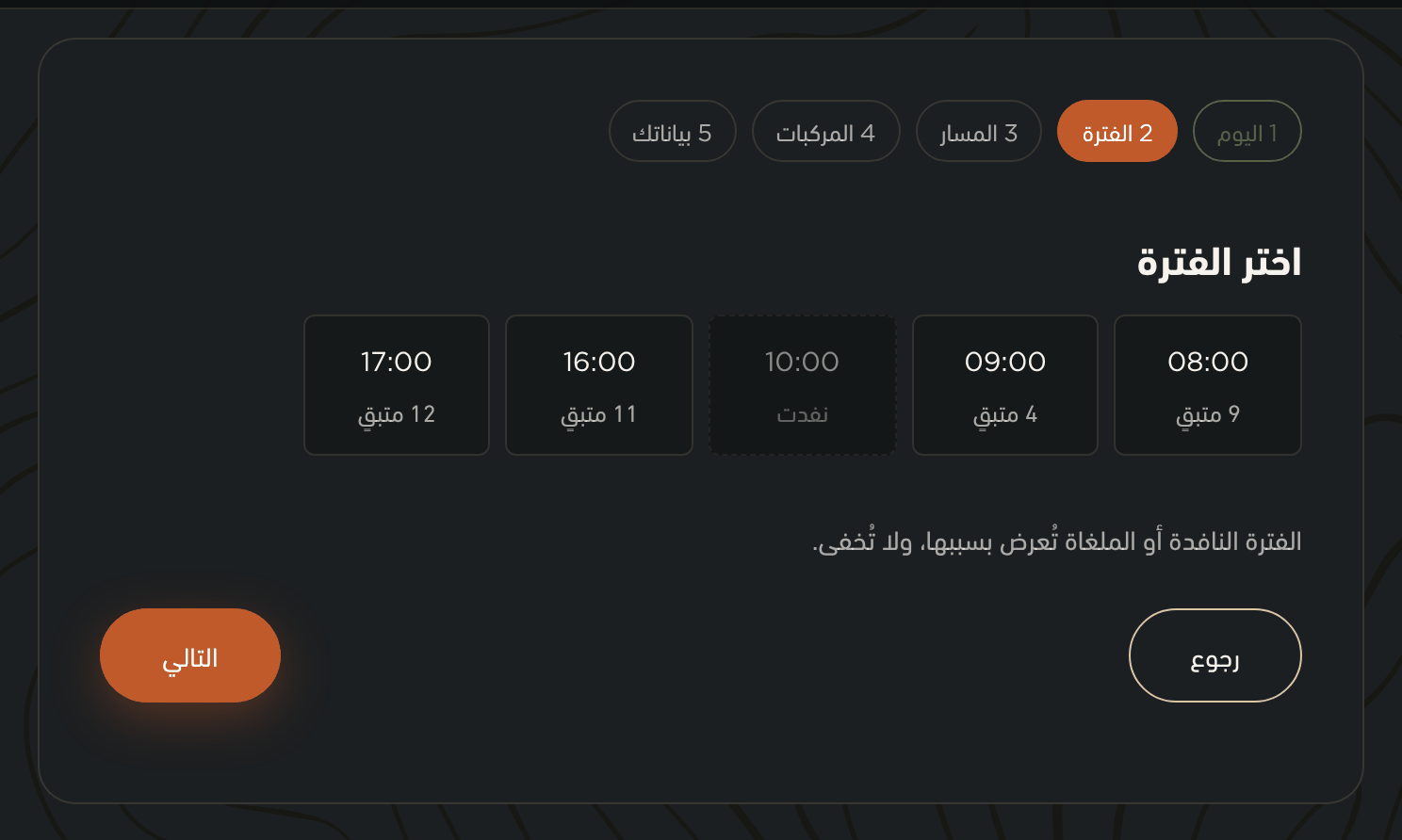
الخطوة الثانية: الفترات المتاحة ومع كل واحدة ما بقي فيهاThe second step: available slots, each with how many places remain اختر المسار
Pick the trail
مركبة لك وحدك، أو مركبة لشخصين. والسعر للمركبة لا للشخص: فشخصان في مركبة واحدة يدفعان سعر المركبة مرّة واحدة.
A vehicle to yourself, or a vehicle for two. The price is per vehicle, not per person: two people in one vehicle pay the vehicle price once.
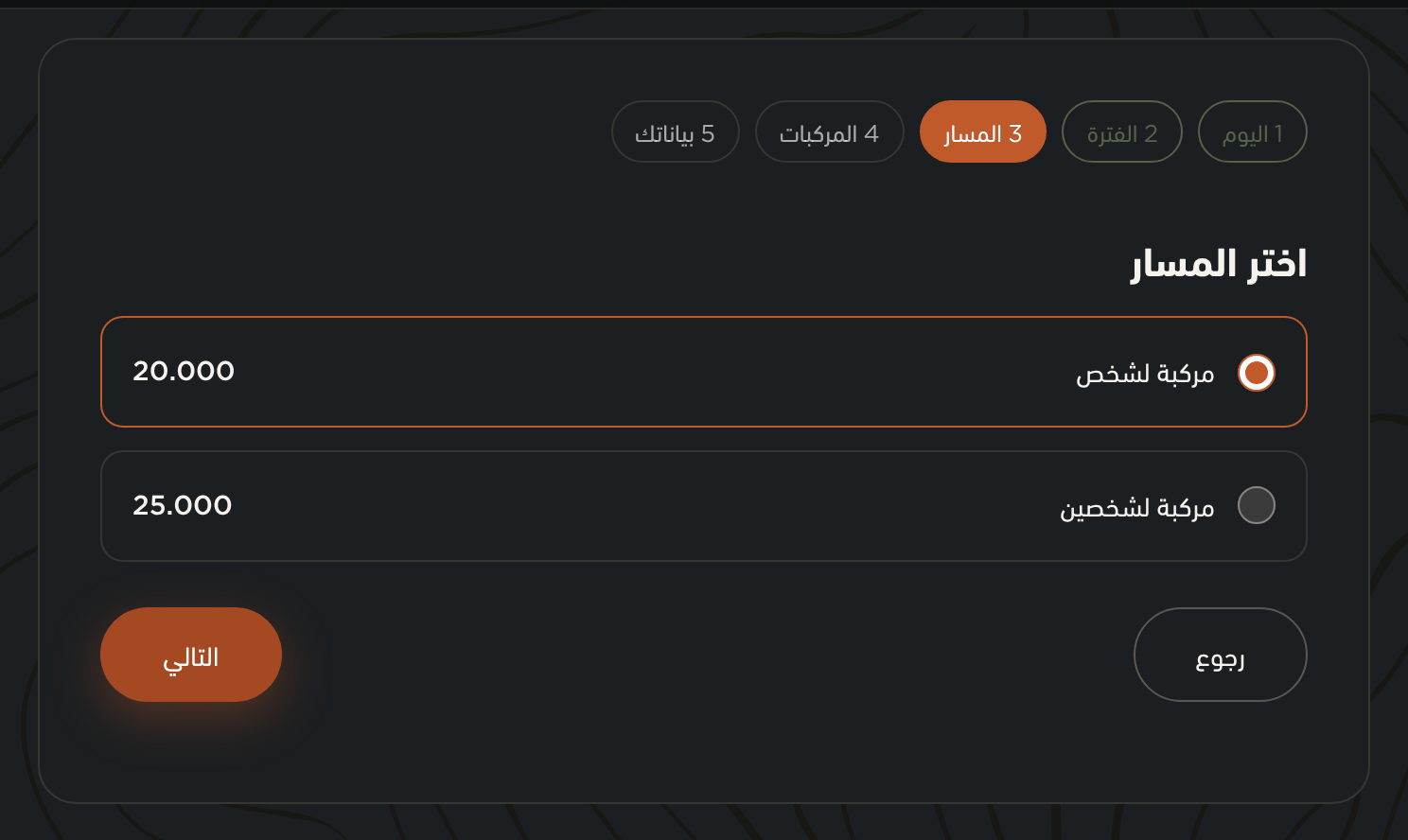
الخطوة الثالثة: خياران بسعر كلٍّ منهماThe third step: two options, each with its price العدد ورمز الخصم
How many, and a discount code
أربعة أفراد يحتاجون مركبتين. وإن كان معك رمز خصم فاكتبه واضغط «تحقّق» — يُفحَص فوراً ويظهر أثره في الملخّص قبل أن تدفع.
Four people need two vehicles. If you have a discount code, type it and press “Apply” — it is checked at once and its effect shows in the summary before you pay.
الملخّص أسفل الخطوة يعرض الإجمالي ومنه الضريبة. والرقم من خادمنا في كل تغيير، فما تراه هو ما ستدفعه.
The summary at the bottom shows the total and the VAT within it. It comes from our server on every change, so what you see is what you will pay.
رمزٌ واحد لكل طلب. ورمزٌ مرفوض يُقال لك سببه — منتهٍ، أو لتجربةٍ أخرى، أو استُخدم قبلاً.One code per order. A rejected code is explained — expired, for a different experience, or already used.
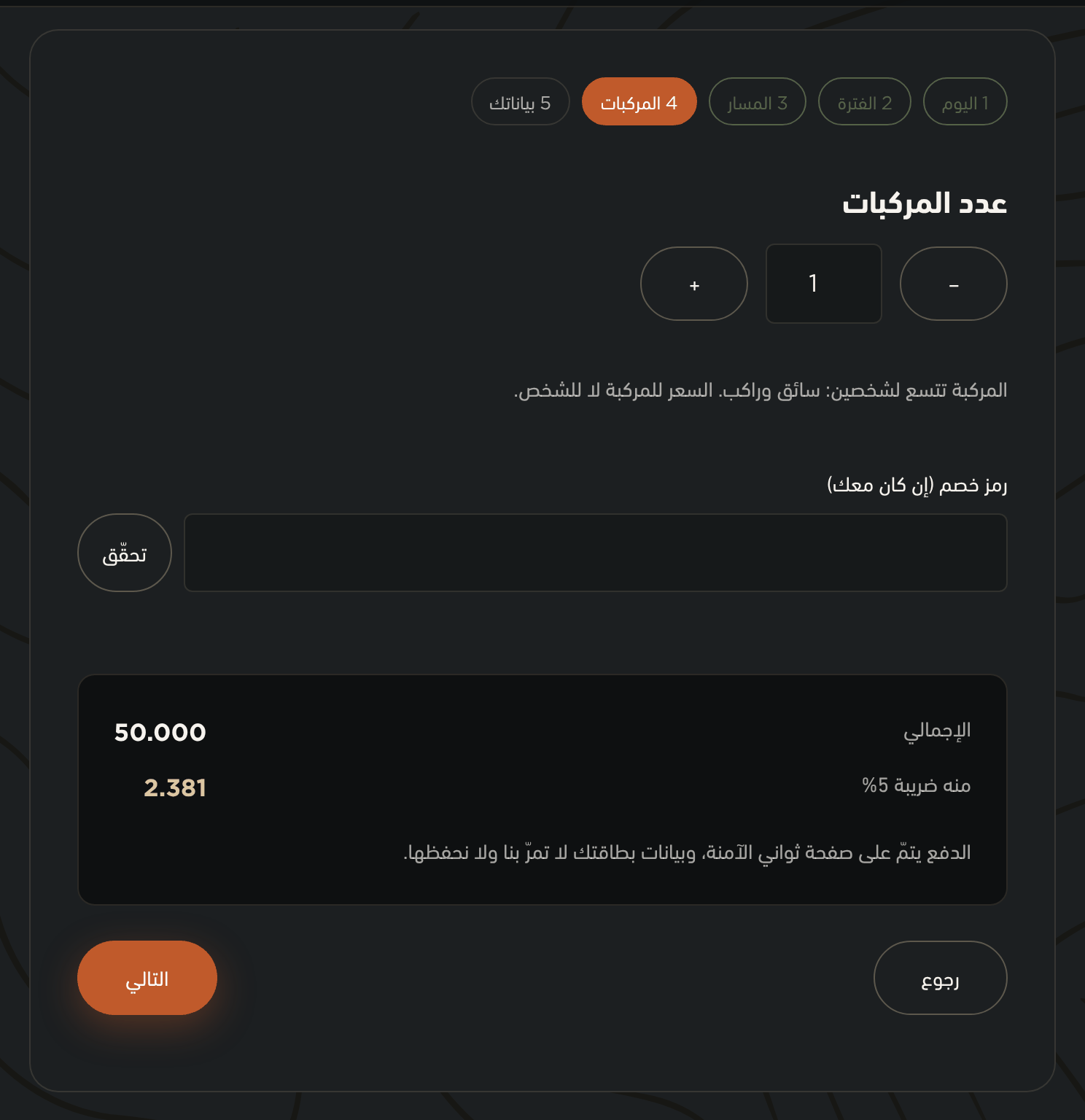
الخطوة الرابعة: عدد المركبات وحقل رمز الخصم وملخّص المبلغThe fourth step: number of vehicles, the discount code field, and the amount summary بياناتك ثم الدفع
Your details, then payment
الاسم والبريد والجوال. وعلامتان تُؤكَّدان: إقرار إخلاء المسؤولية — وتوقّعه ورقياً عند الوصول — وموافقتك على الشروط وسياسة الاسترداد.
Name, email and mobile. Two boxes to confirm: the liability waiver — which you sign on paper when you arrive — and your acceptance of the Terms and the Refund Policy.
ثم «ادفع على ثواني». تنتقل إلى صفحة ثواني، تُدخل بطاقتك هناك، وتعود إلينا.
Then “Pay with Thawani”. You move to Thawani's page, enter your card there, and come back to us.
بريدك هو الذي تجد به حجوزاتك لاحقاً، فاكتبه صحيحاً. ومقعدك محجوز مؤقتاً أثناء الدفع، فأكمِله في بضع دقائق أو أعد المحاولة.Your email is how you find your bookings later, so enter it correctly. Your seat is held while you pay, so finish within a few minutes or start again.
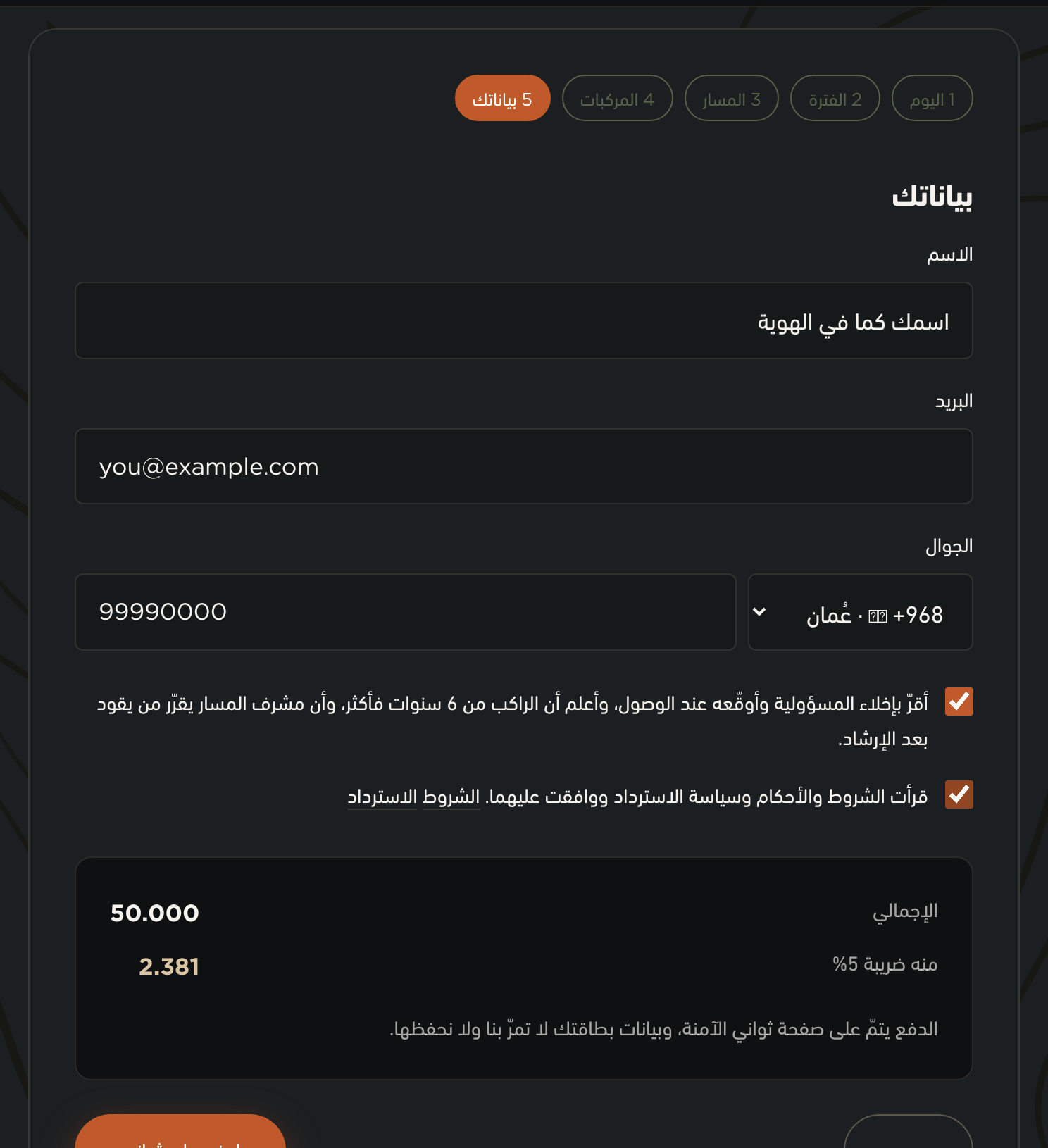
الخطوة الخامسة: الاسم والبريد والجوال وإقرارا الموافقةThe fifth step: name, email, mobile, and the two consent checkboxes
بعد الدفع
After you pay
التذكرة تظهر بعد تأكيد الدفع
Your ticket appears once payment is confirmed
عودتك من صفحة ثواني ليست هي التأكيد. نسأل ثواني عن حالة الدفع ونصدّقها هي، ثم تظهر تذكرتك في الصفحة مع مرجع حجزك — VNT ورقم.
Returning from Thawani's page is not the confirmation. We ask Thawani for the payment status and trust that, and then your ticket appears on the page with your booking reference — VNT and a number.
احفظ المرجع أو صوّر الشاشة. وهو ما نبحث به عن حجزك إن اتصلت.
Save the reference or screenshot it. It is what we look your booking up by if you call.
احضر قبل موعدك بنصف ساعة إلى ثلاث أرباع
Arrive thirty to forty-five minutes early
التسجيل وتوقيع الإقرار وقياس الخوذة والشرح تأخذ وقتاً، والوقت المتبقّي ليس من رحلتك.
Registration, signing the waiver, fitting a helmet and the briefing take time, and that time is not taken out of your trip.
الحساب — لماذا وكيف
The account — why, and how
الحساب ليس شرطاً للحجز. وفائدته أنّك ترى حجوزاتك في مكان واحد وتُلغي منه بنفسك.
An account is not required to book. Its use is that you see your bookings in one place and can cancel them yourself.
أنشئ حساباً ببريدك
Register with your email
افتح «حسابي» من القائمة، واختر «حساب جديد»، واكتب بريدك وكلمة مرور.
Open “My Account” from the menu, choose “Register”, and enter your email and a password.
وإن كنت حجزت قبلاً كضيف بالبريد نفسه، ظهرت تلك الحجوزات في حسابك عند التسجيل — لا يضيع منها شيء.
And if you booked as a guest earlier with the same email, those bookings appear in your account when you register — none of them is lost.
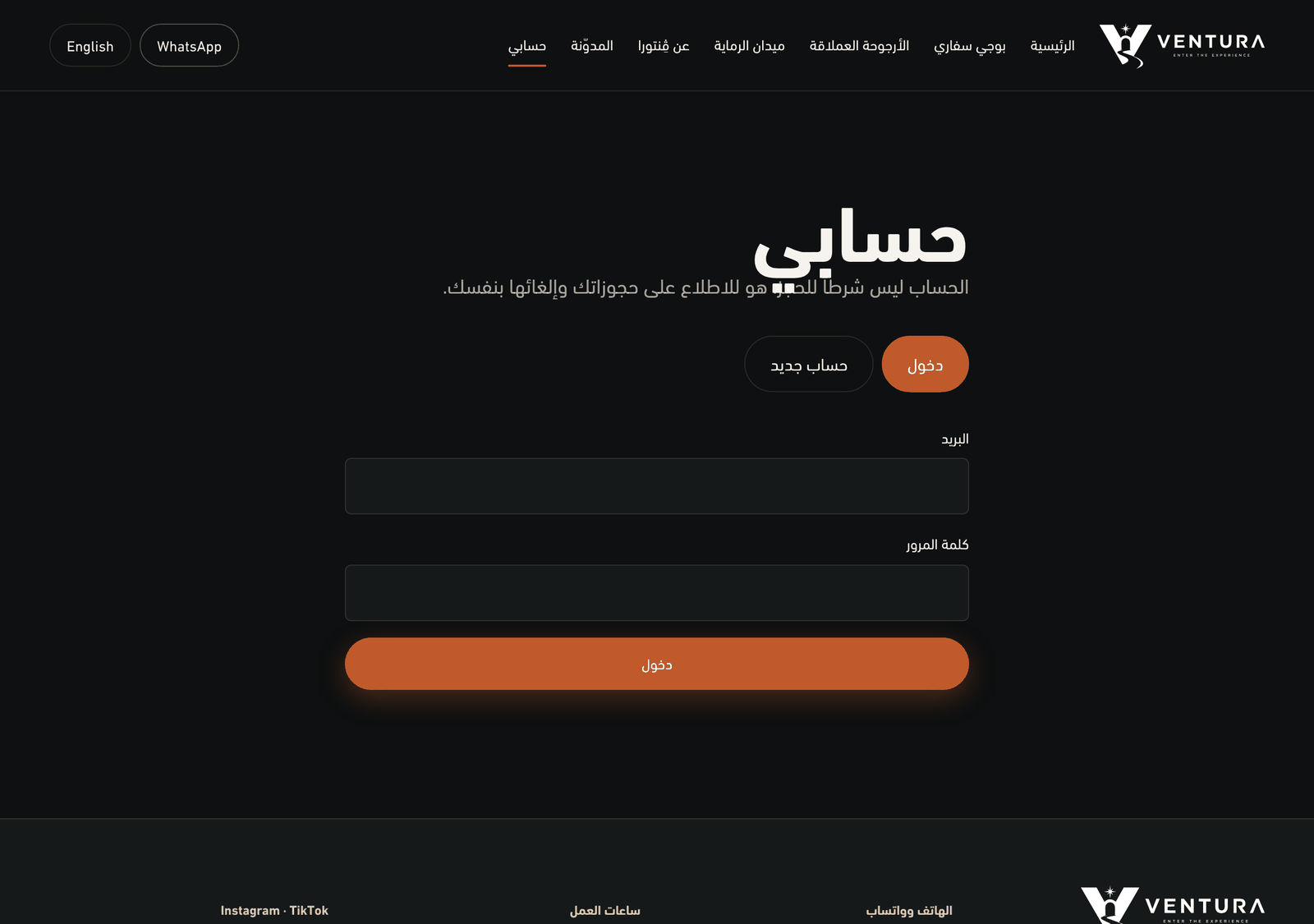
صفحة الحساب: الدخول وإنشاء حساب جديدThe account page: sign in and register الإلغاء من حسابك
Cancelling from your account
أمام كل حجز قادم زرّ إلغاء. وما يحدث بعده يعتمد على الوقت المتبقّي، وهو مكتوب كما هو في سياسة الاسترداد.
Each upcoming booking has a cancel button. What follows depends on how much time is left, and it is set out plainly in the Refund Policy.
وقبل الموعد بأكثر من أربع وعشرين ساعة: استرداد كامل. وتحت عشر ساعات: تواصل معنا ونتفاهم. ومن لم يحضر ولم يُلغِ: لا استرداد.
More than twenty-four hours before the slot: a full refund. Under ten hours: contact us and we settle it together. If you neither show up nor cancel: no refund.
المال يعود إلى وسيلة الدفع نفسها، ووصوله إلى بطاقتك يأخذ أياماً من البنك لا منّا.The money returns to the same payment method; the days it takes to reach your card are the bank's, not ours.
الأرجوحة والرماية — طلب لا حجز
The swing and the range — a request, not a booking
اترك بياناتك ونتصل بك
Leave your details and we will call you
هاتان التجربتان تُرتَّبان بالتواصل: تكتب اسمك وجوالك وعدد الأشخاص واليوم الذي تفضّله، ونتصل بك على واتساب لنتفق.
These two are arranged by contact: you enter your name, mobile, number of people and preferred day, and we message you on WhatsApp to agree.
ولا دفع في تلك الصفحة. السعر معلن فيها، والموعد يُتفق عليه معك.
There is no payment on that page. The price is stated there, and the time is agreed with you.
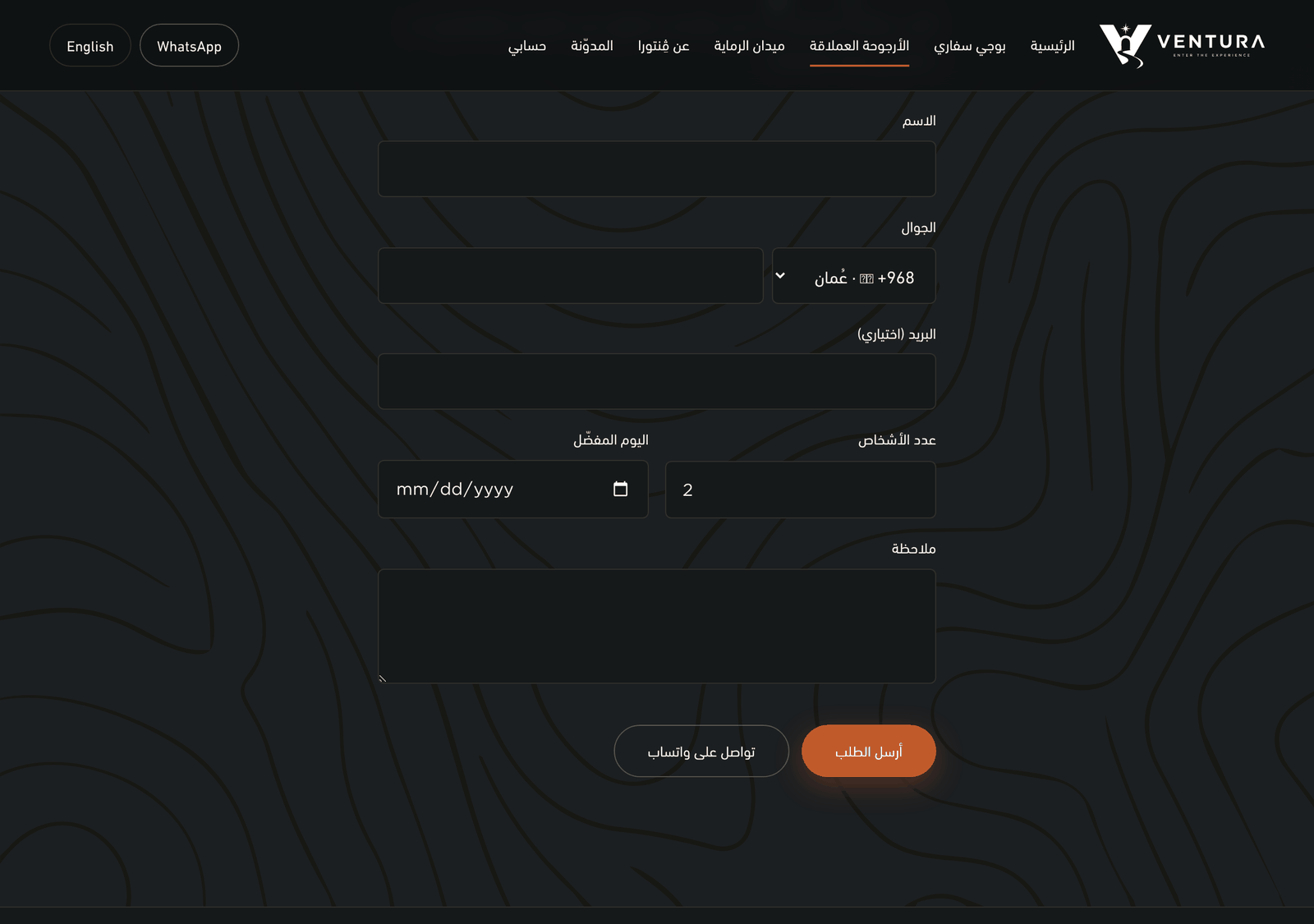
صفحة الأرجوحة العملاقة ونموذج الطلب فيهاThe Giant Swing page with its request form
أسئلة عن الحجز
Questions about booking
هل يجب أن أُنشئ حساباً لأحجز؟Do I need an account to book?
لا. تحجز وتدفع كضيف. وإن سجّلت لاحقاً بالبريد نفسه ظهرت حجوزاتك السابقة في حسابك.
No. You can book and pay as a guest. If you register later with the same email, your earlier bookings appear in your account.
دفعت ولم تظهر التذكرة، ماذا أفعل؟I paid but no ticket appeared — what now?
انتظر لحظات وأعد تحميل الصفحة: التأكيد يأتي من ثواني لا من عودتك. وإن لم تظهر، اتصل بنا بمرجع الحجز أو بالبريد الذي دفعت به — لا تدفع مرّة ثانية.
Wait a moment and reload: the confirmation comes from Thawani, not from your return. If it still does not appear, contact us with the booking reference or the email you paid with — do not pay a second time.
هل أستطيع تغيير موعد حجزي؟Can I change my booking time?
تواصل معنا ونحوّله لك إلى فترة أخرى إن كان فيها متاح. والتحويل يجريه فريقنا لا الموقع.
Contact us and we will move it to another slot if one is open. Moving a booking is done by our team, not on the site.
أين أجد رمز الخصم؟Where do I find a discount code?
في حملاتنا على إنستغرام وتيك توك حين تكون. ولا رمز دائم، ولا نطلب منك أن تبحث عن واحد لتحجز.
In our Instagram and TikTok campaigns when they run. There is no permanent code, and we do not expect you to hunt for one in order to book.
هل تحفظون بيانات بطاقتي؟Do you store my card details?
لا. البطاقة تُدخَل على صفحة ثواني، وما يصلنا هو نتيجة الدفع لا أرقام البطاقة.
No. The card is entered on Thawani's page, and what reaches us is the payment result, not the card numbers.
لم تجد جوابك؟
Did not find your answer?
اتصل بنا أو راسلنا على واتساب. ومعك مرجع حجزك إن كان لك حجز، فهو يختصر الحديث.
Call us or message us on WhatsApp. Have your booking reference to hand if you have one — it shortens the conversation.